Join the Game4Freak Discord Get exclusive plugin sneak peeks, talk directly with VisEntities, never miss important updates, and unlock special discount codes!

Boat Spawns Cut in Half

laurent.mazenq

Customer

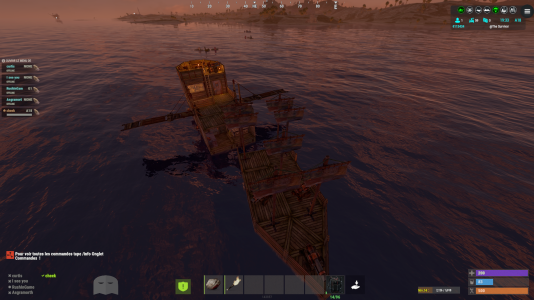
bonjour j ai fait un bateaux mais quant il spawn il et couper en deux
 

Attachments

  • Capture d'écran 2026-03-03 024427.png
    Capture d'écran 2026-03-03 024427.png
    2.7 MB · Views: 2
Your paste file is broken. Out of all the building pieces, only about half are actually attached to the boat. The rest are loose world objects. That's why one half moves and the other stays frozen in place

If you built it in sandbox or god mode, or spawned pieces manually, they might look like a boat but are not actually parented to the PlayerBoat entity. They have to be real boats built normally through the game's boat building system, fully functional and sailable. No admin magic boats

Redo the copy using a proper working boat. After copying it, always paste it first and test it. Get on, sail it around, and make sure everything moves together and works correctly. If it sails fine after pasting, then it is safe to use with the plugin
 
Back
Top
Chat commands start with a /, while console commands can be entered directly in the F1 console or server console. Use find <keyword> in console to search for available commands related to the plugin. Parameters in < > are required, while [ ] are optional.
This plugin uses Oxide's permission system. Grant or revoke permissions using oxide.grant and oxide.revoke. You can assign them to individual players or groups using their Steam id or group name.
Settings are stored in the config file found under the config/ directory. You can edit this file manually, then reload the plugin to apply your changes.
Persistent data is saved in the data/ directory. This includes things like saved settings, usage stats, or player progress depending on the plugin. Deleting a data file will reset stored progress or customizations.
Language files are located in the lang/ folder. To translate messages, copy the en.json file into your target language folder (e.g. fr, de) and edit the values. Reload the plugin after changes to apply new messages.
This section lists public methods exposed by the plugin for use in other plugins. You can call these via the CallHook method. Ensure the plugin is loaded before calling its API to avoid null reference errors.
These are custom hooks that other plugins can listen for. Simply define a method with the same name and expected parameters in your plugin to handle the event. Hooks are triggered at key moments and are useful for extending or reacting to plugin behavior.
These hooks are injected into the game's code using Harmony. They let the plugin run code at key points in the game's internal logic. You can return values to block or modify behavior. Use with caution — these are powerful and can affect core mechanics.
Cart