- Dependencies
- Copy Paste (Required)
- Works With
Important - Patched CopyPaste Required
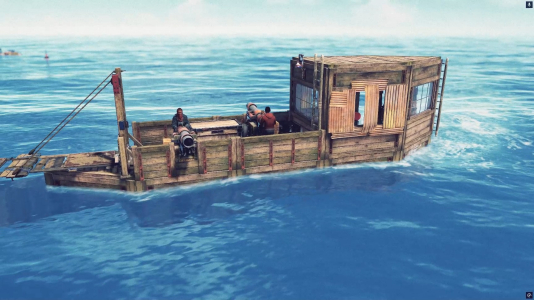
Raidable Boats spawns armed pirate boats that autonomously navigate the ocean. Each boat comes equipped with NPC cannon gunners, a helmsman at the wheel, locked loot containers, and map markers -- creating a naval PvE encounter that players can board, fight through, and plunder.
Boats are built from Copy Paste files, meaning any player-designed boat can become a raidable event. A profile system ties each boat design to a difficulty tier, controlling NPC health, cannon accuracy, loot quality, and rewards. Boats spawn on a timer or are maintained at a target count, cruise between waypoints, and despawn after a configurable lifetime or once the raid is completed.
The plugin handles the full lifecycle: ocean pathfinding, NPC combat (both cannon-mounted and dismounted gunfire), raid engagement tracking, loot milestone announcements, raid completion conditions, reward distribution, and a sinking sequence when the raid is over.
Features
- Profile system - Define multiple boat designs, each linked to a Copy Paste file and difficulty tier
- Autonomous navigation - Boats cruise between ocean waypoints, avoid shallow water, ice, monuments, and other raid boats
- Cannon NPC gunners - NPCs mount cannons and engage nearby player boats with adjustable accuracy and fire rate
- Helmsman NPC - An NPC steers the boat; killing the helmsman stops the boat
- Dismounted combat - Gunners and helmsmen can leave their stations to fight players who board the boat at close range
- Defender respawn - Killed NPCs respawn after a configurable delay
- Difficulty tiers - Easy, Medium, Hard, and Nightmare tiers that scale NPC health, loot, cannon stats, and rewards
- Loot generation - Use loot from the Copy Paste file or generate it from configurable loot tables with drop chances
- Code-locked doors and containers - Doors and storage containers can be randomly locked with code locks
- Raid completion tracking - Configurable conditions based on loot percentage looted and/or all defenders killed
- Map markers - Moving vending machine markers with difficulty-colored radius indicators
- Reward integration - Distribute Economics currency and Server Rewards points on completion
- Scheduled and maintained spawning - Spawn on a timer, maintain a target count, or both
- Anti-exploit protections - Block building, entity pickup, steering, sail/anchor/engine/cannon interaction on raid boats
- Floating loot on sink - Remaining loot drops into the water when the boat sinks
- Debug visualization - Admin draw commands showing navigation paths, waypoints, speed, and ocean spawn nodes
Dependencies
- Copy Paste -- Required. All boat designs are pasted from Copy Paste files
- Economics -- Currency rewards on raid completion
- Server Rewards -- Point rewards on raid completion
- Gear Core -- Apply gear sets to NPC defenders instead of manual clothing lists
Permissions
raidableboats.admin-- Grants access to all admin console commands (rb.spawn,rb.despawn,rb.tp,rb.list,rb.profiles,rb.reload,rb.stats,rb.debug,rb.shownodes,rb.help)
Commands
All commands are console commands (F1 or RCON). The/stats chat command is available to all players.Player Commands
/stats-- Displays the player's personal raid statistics (boats raided, last raid time)
Admin Commands
Requiresraidableboats.admin.rb.spawn [profile] [here|x y z]-- Spawns a raidable boat. If no profile is specified, one is chosen randomly by weight. If no position is given, a valid ocean position is found automaticallyprofile-- Name of the boat profile to spawnhere-- Spawn at the calling player's current positionx y z-- Spawn at specific world coordinates
rb.despawn <nearest|all|net_id>-- Despawns raidable boatsnearest-- Despawns the boat closest to the calling playerall-- Despawns all active raidable boatsnet_id-- Despawns the boat with the specified network ID (shown inrb.list)
rb.tp [profile]-- Teleports the calling player to a raidable boat. If no profile is specified, teleports to the nearest boatrb.list-- Lists all active raidable boats with their profile, difficulty, grid location, network ID, state, NPC count, and remaining lootrb.profiles-- Lists all loaded boat profiles with their difficulty tier, enabled status, and Copy Paste filenamerb.reload-- Reloads boat profiles from the data folder without restarting the pluginrb.stats <player>-- Views raid statistics for a specific player by name or Steam IDrb.debug-- Toggles debug visualization for admins, showing navigation paths, waypoints, speed, steering, and velocity arrowsrb.shownodes-- Draws all ocean spawn nodes as cyan boxes for 30 secondsrb.help-- Displays a summary of all available commands
Boat Profiles
Profiles are the core of the plugin. Each profile links a Copy Paste file to a difficulty tier and defines how the boat behaves as a raid event.How Profiles Work
Profile files are stored inoxide/data/RaidableBoats/Profiles/. Each .json file in this folder is loaded as a profile. On first run, a default profile is created automatically.A boat design is built in-game using the player boat system (hull, cannons, storage, doors, steering wheel, engine, sails), then saved with Copy Paste. The profile points to that saved file.
Profile Structure
JSON:
{
  "Enabled": true,
  "Profile Name": "default",
  "CopyPaste File Name": "raidboat_default",
  "Difficulty Tier": "Medium",
  "Protection Radius (Blocks Building)": 30.0,
  "Spawn Weight (Higher = More Likely To Be Chosen)": 1.0,
  "Loot Source (CopyPaste = Use Pasted Loot, Plugin = Generate From Loot Table)": "Plugin",
  "Custom Loot Table (Override For Plugin Loot Source)": null,
  "Extra CopyPaste Paste Options (e.g. inventories:true, deployables:false)": {}
}Enabled-- Whether this profile is available for spawningProfile Name-- Unique identifier used in commands and loggingCopyPaste File Name-- Name of the Copy Paste file inoxide/data/copypaste/(without extension). The plugin validates this file exists on loadDifficulty Tier-- Must match one of the tier names defined in the config (e.g.,"Easy","Medium","Hard","Nightmare")Protection Radius-- Radius in meters around the boat where player building is blockedSpawn Weight-- Relative weight for random selection. A weight of3.0is three times more likely to be chosen than1.0Loot Source-- "CopyPaste" uses whatever inventory was saved in the paste file. "Plugin" clears containers and fills them from the loot tableCustom Loot Table-- When set and loot source is"Plugin", overrides the default loot table from the config. Set tonullto use the defaultExtra CopyPaste Paste Options-- Additional key-value pairs passed to Copy Paste (e.g.,"deployables": "false")
Boat Design Requirements
The pasted boat must include:- A
PlayerBoatentity (the hull) - A
SmallEngine(for movement) - A
SteeringWheel(for the helmsman NPC)
- One or more
Cannonentities (for NPC gunners) - One or more
StorageContainerentities (for loot)
Pre-configured Starter Profiles
The plugin ships with a single default profile on first install. For a ready-to-go fleet covering all four difficulty tiers, a set of pre-configured profiles and their matching Copy Paste files are available in the Starter Boat Profiles & CopyPaste Files thread.The starter pack includes four boats:
| Profile | Difficulty | Spawn Weight | Description |
|---|---|---|---|
| Skiff | Easy | 3.0 | Small, lightly armed boat. Spawns most frequently |
| Brigantine | Medium | 2.0 | Mid-size vessel with moderate defenses |
| Galleon | Hard | 1.0 | Large, well-armed ship |
| Man-o-War | Nightmare | 0.5 | Heavily fortified warship. Rare spawn |
- Download the four profile files (
skiff.json,brigantine.json,galleon.json,man-o-war.json) and place them inoxide/data/RaidableBoats/Profiles/ - Download the four Copy Paste files (
raidboat_skiff.json,raidboat_brigantine.json,raidboat_galleon.json,raidboat_manowar.json) and place them inoxide/data/copypaste/ - Run
rb.reloadin the server console to load the new profiles
Creating Multiple Profiles
Create additional.json files in the profiles folder. For example, a fleet with varying difficulty:oxide/data/RaidableBoats/Profiles/skiff.json-- Easy tier, small boat, high spawn weightoxide/data/RaidableBoats/Profiles/brigantine.json-- Medium tier, medium boatoxide/data/RaidableBoats/Profiles/galleon.json-- Hard tier, large boat, low spawn weightoxide/data/RaidableBoats/Profiles/man-o-war.json-- Nightmare tier, heavily armed
rb.reload to load them without restarting.Configuration
General Settings
JSON:
{
  "General Settings": {
    "Maximum Active Boats": 3,
    "Block Player Building On Boats": true,
    "Block Entity Pickup On Boats": true,
    "Block Mounting Steering Wheel": true,
    "Block Boat Editing (Push And Rotate)": true,
    "Block Sail Interaction": true,
    "Block Anchor Interaction": true,
    "Block Player Cannon Interaction": true,
    "Block Engine Interaction": true,
    "Lock Doors With Code Locks": true,
    "Door Lock Chance Percentage (0-100)": 100.0,
    "Lock Storage Containers With Code Locks": true,
    "Container Lock Chance Percentage (0-100)": 30.0,
    "Never Lock These Prefabs (Full Prefab Path)": [],
    "Prefabs Exempt From Building Block (Full Prefab Path)": [
      "assets/prefabs/deployable/ladder.wall.wood/ladder.wall.wood.deployed.prefab"
    ],
    "Chat Prefix Text": "[Raidable Boats]",
    "Chat Prefix Color (Hex)": "#4A90D9"
  }
}
Maximum Active Boats-- Hard cap on how many raidable boats can exist at the same timeBlock Player Building On Boats-- Prevents players from placing deployables on or near raid boatsBlock Entity Pickup On Boats-- Prevents players from picking up entities attached to the boatBlock Mounting Steering Wheel-- Prevents players from sitting at the helmBlock Boat Editing-- Prevents pushing or rotating the boatBlock Sail Interaction-- Prevents players from raising, lowering, or rotating sailsBlock Anchor Interaction-- Prevents players from dropping the anchor. The plugin automatically raises anchors if they are loweredBlock Player Cannon Interaction-- Prevents players from mounting or firing cannonsBlock Engine Interaction-- Prevents players from starting, stopping, reversing, or fueling enginesLock Doors With Code Locks-- Attaches random code locks to lockable doorsDoor Lock Chance Percentage-- Chance each door gets lockedLock Storage Containers With Code Locks-- Attaches random code locks to storage containers that support locksContainer Lock Chance Percentage-- Chance each container gets lockedNever Lock These Prefabs-- Full prefab paths that should never receive code locksPrefabs Exempt From Building Block-- Full prefab paths that players are allowed to place even with building block enabled (e.g., ladders for boarding)Chat Prefix Text-- Text shown before chat messages from the pluginChat Prefix Color-- Hex color for the chat prefix
Spawn Settings
JSON:
{
  "Spawn Settings": {
    "Enable Scheduled Spawning (Timed Intervals)": true,
    "Scheduled Spawn Interval In Minutes": 30.0,
    "Minimum Online Players For Scheduled Spawn": 1,
    "Enable Maintained Spawning (Keeps Target Count Active)": true,
    "Maintained Boat Target Count": 2,
    "Allowed Ocean Biomes For Spawning": ["Arid", "Temperate", "Tundra", "Arctic", "Jungle"],
    "Minimum Distance Between Boats": 300.0,
    "Minimum Distance From Shore": 100.0,
    "Minimum Distance From Monuments": 150.0
  }
}
Enable Scheduled Spawning-- Spawns a new boat at regular intervalsScheduled Spawn Interval In Minutes-- Time between scheduled spawn attemptsMinimum Online Players For Scheduled Spawn-- Minimum player count required for both scheduled and maintained spawnsEnable Maintained Spawning-- Continuously checks and spawns boats to maintain the target countMaintained Boat Target Count-- How many boats the plugin tries to keep active at all timesAllowed Ocean Biomes For Spawning-- Restricts spawn positions to specific biome regions. Accepts:Arid,Temperate,Tundra,Arctic,Jungle,DeepSeaMinimum Distance Between Boats-- Minimum spacing between active raidable boatsMinimum Distance From Shore-- How far from land boats must spawnMinimum Distance From Monuments-- Minimum distance from monuments for spawn positions
Difficulty Tiers
JSON:
{
  "Difficulty Tiers": {
    "Easy": {
      "Defender Health Multiplier": 0.75,
      "Defender Count Multiplier": 0.5,
      "Loot Amount Multiplier": 0.75,
      "Cannon Accuracy Multiplier": 0.5,
      "Cannon Fire Rate Multiplier": 0.7,
      "Reward Amount Multiplier": 0.5,
      "Dismounted Combat Damage Multiplier": 0.5,
      "Dismounted Combat Accuracy Multiplier": 0.7,
      "Map Marker Color (Hex)": "#00FF00",
      "Announcement Color (Hex)": "#55D455"
    },
    "Medium": {
      "Defender Health Multiplier": 1.0,
      "Defender Count Multiplier": 1.0,
      "Loot Amount Multiplier": 1.0,
      "Cannon Accuracy Multiplier": 1.0,
      "Cannon Fire Rate Multiplier": 1.0,
      "Reward Amount Multiplier": 1.0,
      "Dismounted Combat Damage Multiplier": 1.0,
      "Dismounted Combat Accuracy Multiplier": 1.0,
      "Map Marker Color (Hex)": "#FFFF00",
      "Announcement Color (Hex)": "#F5D442"
    },
    "Hard": {
      "Defender Health Multiplier": 2.0,
      "Defender Count Multiplier": 1.5,
      "Loot Amount Multiplier": 1.5,
      "Cannon Accuracy Multiplier": 1.5,
      "Cannon Fire Rate Multiplier": 1.3,
      "Reward Amount Multiplier": 2.0,
      "Dismounted Combat Damage Multiplier": 1.5,
      "Dismounted Combat Accuracy Multiplier": 1.2,
      "Map Marker Color (Hex)": "#FF8C00",
      "Announcement Color (Hex)": "#FF8C00"
    },
    "Nightmare": {
      "Defender Health Multiplier": 3.0,
      "Defender Count Multiplier": 2.0,
      "Loot Amount Multiplier": 2.0,
      "Cannon Accuracy Multiplier": 2.0,
      "Cannon Fire Rate Multiplier": 1.5,
      "Reward Amount Multiplier": 3.0,
      "Dismounted Combat Damage Multiplier": 2.0,
      "Dismounted Combat Accuracy Multiplier": 1.4,
      "Map Marker Color (Hex)": "#FF0000",
      "Announcement Color (Hex)": "#FF4444"
    }
  }
}Defender Health Multiplier-- Multiplied against the base health of gunners and helmsmenDefender Count Multiplier-- Multiplied againstGunners Per Boatto determine how many cannons are crewedLoot Amount Multiplier-- Scales item amounts in loot containersCannon Accuracy Multiplier-- Higher values reduce cannon aim offset (more accurate)Cannon Fire Rate Multiplier-- Higher values reduce time between cannon shots (faster firing)Reward Amount Multiplier-- Scales Economics and Server Rewards payoutsDismounted Combat Damage Multiplier-- Scales per-hit damage when NPCs fight dismountedDismounted Combat Accuracy Multiplier-- Scales hit chance when NPCs fight dismountedMap Marker Color-- Color of the map marker radius circle for boats of this tierAnnouncement Color-- Color used when the difficulty name appears in chat announcements
NPC Defender Settings
JSON:
{
  "NPC Defender Settings": {
    "Gunner Base Health (Before Difficulty Multiplier)": 150.0,
    "Gunners Per Boat (Before Difficulty Multiplier)": 4,
    "Defender Display Name": "Pirate Crew",
    "Make Gunners Invincible": false,
    "Starting Cannonballs Per Cannon": 20,
    "Infinite Cannonballs (Never Run Out)": true,
    "Enable Defender Respawn After Death": true,
    "Defender Respawn Delay In Seconds": 120.0,
    "Gunner Loadout Kits (Random Per Spawn)": [...],
    "Helmsman Loadout Kits (Random Per Spawn)": [...],
    "Gunner Loot Table (Dropped On Death)": [...],
    "Helmsman Loot Table (Dropped On Death)": [...],
    "Enable Helmsman NPC On Steering Wheel": true,
    "Helmsman Base Health (Before Difficulty Multiplier)": 200.0,
    "Enable Gunner Dismount Combat (Leave Cannon To Fight)": true,
    "Gunner Dismount Trigger Range": 30.0,
    "Gunner Retaliation Range (Dismount When Shot)": 100.0,
    "Gunner Dismounted Damage Per Hit": 15.0,
    "Gunner Dismounted Accuracy (0 - 100)": 60.0,
    "Enable Helmsman Dismount Combat (Leave Wheel To Fight)": true,
    "Helmsman Dismount Trigger Range": 30.0,
    "Helmsman Retaliation Range (Dismount When Shot)": 100.0,
    "Helmsman Dismounted Damage Per Hit": 15.0,
    "Helmsman Dismounted Accuracy (0 - 100)": 60.0
  }
}
Gunner Base Health-- Base HP for cannon gunners before the difficulty tier multiplier is appliedGunners Per Boat-- Base number of cannon gunners to spawn. Multiplied by the tier'sDefender Count Multiplier, then capped at the number of available cannons on the boatDefender Display Name-- Display name shown for NPC defendersMake Gunners Invincible-- Whentrue, cannon gunners cannot be damagedStarting Cannonballs Per Cannon-- Ammo placed in each cannon's hidden stashInfinite Cannonballs-- Whentrue, ammo stashes are automatically refilled after each shotEnable Defender Respawn After Death-- Dead NPCs respawn at their original station after a delayDefender Respawn Delay In Seconds-- Time before a killed NPC respawnsGunner Loadout Kits-- List of possible loadouts for gunners. One is chosen randomly per spawn. See Loadout KitsHelmsman Loadout Kits-- List of possible loadouts for the helmsmanGunner Loot Table-- Items dropped by gunners on death. See Loot Table FormatHelmsman Loot Table-- Items dropped by the helmsman on deathEnable Helmsman NPC On Steering Wheel-- Whether to spawn a helmsman. Without one, the boat does not navigateHelmsman Base Health-- Base HP for the helmsman before difficulty multiplierEnable Gunner Dismount Combat-- Whentrue, gunners leave their cannons to fight players who board the boatGunner Dismount Trigger Range-- Distance at which a gunner will proactively dismount to engage a visible playerGunner Retaliation Range-- Extended range at which a gunner dismounts when directly shot by a playerGunner Dismounted Damage Per Hit-- Base damage per hit when a gunner fights dismounted (before tier multiplier)Gunner Dismounted Accuracy-- Base hit chance for dismounted gunner combat (before tier multiplier)Enable Helmsman Dismount Combat-- Same as gunner dismount, but for the helmsman. When the helmsman dismounts, the boat stops movingHelmsman Dismount Trigger Range-- Proactive dismount range for the helmsmanHelmsman Retaliation Range-- Extended dismount range when the helmsman is shotHelmsman Dismounted Damage Per Hit-- Base damage for dismounted helmsman `combat- Helmsman Dismounted Accuracy` -- Base hit chance for dismounted helmsman combat
Loadout Kit Format
Each loadout kit defines what an NPC spawns with. One kit is randomly selected from the list each time an NPC spawns.
JSON:
{
  "Weapon Shortname": "rifle.ak",
  "Weapon Skin ID (0 = Default)": 0,
  "Ammo Shortname": "ammo.rifle",
  "Ammo Amount": 200,
  "Clothing Shortnames": ["burlap.shirt", "burlap.trousers", "burlap.headwrap", "shoes.boots"],
  "GearCore Set Name (Leave Empty To Ignore)": ""
}
Weapon Shortname-- Item shortname for the weapon given to the NPC during dismounted combatWeapon Skin ID-- Skin ID applied to the weapon. Set to0for defaultAmmo Shortname-- Ammo type placed in the NPC's inventory for the weaponAmmo Amount-- How much ammo to giveClothing Shortnames-- List of clothing item shortnames equipped on the NPCGearCore Set Name-- If set and Gear Core is loaded, equips the named gear set instead of using the clothing list
Loot Table Entry Format
Used in NPC death loot tables, the default loot table, and custom profile loot tables.
JSON:
{
  "Item Shortname": "scrap",
  "Minimum Amount": 50,
  "Maximum Amount": 200,
  "Drop Chance Percent (0 - 100)": 100.0,
  "Skin ID (0 = Default)": 0,
  "Is Blueprint": false,
  "Custom Item Display Name (Leave Empty For Default)": ""
}
Item Shortname-- Rust item shortnameMinimum Amount-- Minimum stack size (inclusive)Maximum Amount-- Maximum stack size (inclusive). A random value between min and max is chosenDrop Chance Percent-- Chance this entry is includedSkin ID-- Skin applied to the item.0for defaultIs Blueprint-- Whentrue, creates a blueprint of this item instead of the item itselfCustom Item Display Name-- Overrides the item's display name. Leave empty for default
Cannon Settings
JSON:
{
  "Cannon Settings": {
    "Maximum Engagement Range": 150.0,
    "Minimum Engagement Range (Dead Zone)": 15.0,
    "Time Between Shots (Seconds)": 6.0,
    "Aim Accuracy Offset (Higher = Less Accurate)": 2.0,
    "Reload Time (Seconds)": 3.0,
    "Cannonball Fuse Time (Seconds, Delay Before Detonation)": 3.0
  }
}
Maximum Engagement Range-- Cannons only fire at targets within this distanceMinimum Engagement Range-- Targets closer than this are ignored (dead zone to prevent self-damage)Time Between Shots-- Base cooldown between cannon shots (divided by the tier's fire rate multiplier)Aim Accuracy Offset-- Random positional offset applied to cannon aim. Higher values mean less accurate shots. Divided by the tier's accuracy multiplierReload Time-- Time to reload a cannonball before firingCannonball Fuse Time-- Delay before the cannonball detonates after firing
Navigation Settings
JSON:
{
  "Navigation Settings": {
    "Minimum Waypoint Distance": 80.0,
    "Maximum Waypoint Distance": 200.0,
    "Idle Duration At Waypoint (Seconds)": 12.0,
    "Spawn Height Above Water": 3.0,
    "Stop Duration After Collision (Seconds)": 15.0
  }
}
Minimum Waypoint Distance-- Minimum distance for the next waypoint from the boat's current positionMaximum Waypoint Distance-- Maximum distance for the next waypointIdle Duration At Waypoint-- How long the boat drifts at a waypoint before picking a new destinationSpawn Height Above Water-- Height offset above water level when spawning the boatStop Duration After Collision-- How long the boat pauses after colliding with a player boat
Loot Settings
JSON:
{
  "Loot Settings": {
    "Default Loot Table (Used When Profile Has No Custom Table)": [
      { "Item Shortname": "scrap", "Minimum Amount": 50, "Maximum Amount": 200, "Drop Chance Percent (0 - 100)": 100.0, "Skin ID (0 = Default)": 0, "Is Blueprint": false, "Custom Item Display Name (Leave Empty For Default)": "" },
      ...
    ]
  }
}
Default Loot Table-- The loot table used when a profile hasLoot Sourceset to"Plugin"and no custom loot table defined. Each container on the boat independently rolls against the table. See Loot Table Entry Format for entry structure
Raid Completion Settings
JSON:
{
  "Raid Completion Settings": {
    "Require Minimum Loot Percentage Looted": true,
    "Minimum Loot Percentage Required (0 - 100)": 80.0,
    "Require All Defenders Killed": false
  }
}
Require Minimum Loot Percentage Looted-- Whentrue, the raid completes only after a percentage of loot items have been taken from containersMinimum Loot Percentage Required-- The threshold percentage of items that must be removedRequire All Defenders Killed-- Whentrue, all NPCs must be dead (with respawn disabled) for the raid to complete. When both conditions are enabled, both must be met
Despawn Settings
Code:
{
  "Despawn Settings": {
    "Maximum Boat Lifetime (Minutes)": 60,
    "Inactive Timeout (Minutes, No Players Nearby)": 20,
    "Drop Floating Loot When Boat Sinks": true,
    "Floating Loot Despawn Time (Minutes)": 5
  }
}
Maximum Boat Lifetime-- Boats are forcibly despawned after this many minutes regardless of stateInactive Timeout-- If a raid is engaged but no progress is made within this time, the boat despawns. A warning is sent to raiders before this happensDrop Floating Loot When Boat Sinks-- Whentrue, remaining loot in containers is dropped as floating item containers when the boat sinksFloating Loot Despawn Time-- How long floating loot containers persist before being removed
Map Marker Settings
JSON:
{
  "Map Marker Settings": {
    "Enable Map Markers": true,
    "Use Vending Machine Marker (Shows Name On Map)": true,
    "Default Marker Color (Hex, Overridden By Difficulty Tier)": "#FF0000",
    "Marker Radius On Map": 0.15,
    "Marker Display Label (Use {difficulty} For Difficulty Name)": "Raidable Boat [{difficulty}]",
    "Position Update Interval (Seconds)": 2.0
  }
}
Enable Map Markers-- Whether to show markers on the map for raidable boatsUse Vending Machine Marker-- Uses a vending machine marker that displays a name label on the mapDefault Marker Color-- Fallback color if the difficulty tier has no color configuredMarker Radius On Map-- Size of the radius circle marker on the mapMarker Display Label-- Text displayed on the vending machine marker. Use {difficulty} as a placeholder for the tier namePosition Update Interval-- How often the marker position is updated as the boat moves
Announcement Settings
JSON:
{
  "Announcement Settings": {
    "Announce When Boat Spawns": true,
    "Announce When Raid Is Engaged": true,
    "Announce When Raid Is Completed": true,
    "Announce When Boat Despawns": false,
    "Announcement Radius (0 = Server Wide)": 0.0
  }
}
Announce When Boat Spawns-- Broadcasts a chat message when a new raidable boat appearsAnnounce When Raid Is Engaged-- Broadcasts when a player begins attacking a boatAnnounce When Raid Is Completed-- Broadcasts when a raid is successfully completedAnnounce When Boat Despawns-- Broadcasts when a boat despawns due to timeoutAnnouncement Radius-- Set to0for server-wide announcements. Any other value limits announcements to players within that radius
Reward Settings
JSON:
{
  "Reward Settings": {
    "Enable Economics Reward On Completion": false,
    "Economics Base Amount (Before Difficulty Multiplier)": 500.0,
    "Enable Server Rewards On Completion": false,
    "Server Rewards Base Points (Before Difficulty Multiplier)": 100
  }
}
Enable Economics Reward On Completion-- Deposits currency to all raiders when the raid completes. Requires EconomicsEconomics Base Amount-- Base currency amount, multiplied by the tier's Reward Amount MultiplierEnable Server Rewards On Completion-- Awards points to all raiders. Requires Server RewardsServer Rewards Base Points-- Base points amount, multiplied by the tier's Reward Amount Multiplier
Raid Lifecycle
Understanding the boat's state progression helps with configuration and troubleshooting.- Spawning -- The Copy Paste file is pasted, the boat is validated (engine, steering wheel, cannons, containers), NPCs are spawned and mounted, loot is populated, code locks are applied, and map markers are created.
- Cruising -- The boat autonomously navigates between ocean waypoints. The helmsman steers, sails are raised, and engines run. Cannons scan for nearby player boats.
- Engaged -- Triggered when a player boards the boat, damages it, loots a container, or hits an NPC with a cannonball. The inactive despawn timer starts. Raiders receive progress messages (defender kills, loot milestones). Dismounted combat activates if players are within range.
- Completing -- The raid completion conditions are met. Rewards are distributed to all raiders. Statistics are updated.
- Sinking -- All NPCs are killed, the boat is flagged as broken, buoyancy is reduced, and the boat slowly sinks over 60 seconds. Floating loot is dropped if configured.
- Despawning -- The boat is removed entirely (due to lifetime expiry, inactive timeout, or admin command). All associated entities, NPCs, markers, and timers are cleaned up.
Stored Data
JSON:
{
  "Active Boats": [],
  "Total Boats Spawned": 42,
  "Total Boats Raided": 28,
  "Player Statistics": {
    "76561198012345678": {
      "Boats Raided": 7,
      "Last Raid Time": "2026-01-15T10:30:00Z"
    }
  }
}
Active Boats-- List of boats that were active at the time of server save, used to restore boats after a restart. Cleared after restorationTotal Boats Spawned-- Lifetime counter of all boats spawnedTotal Boats Raided-- Lifetime counter of all boats successfully raidedPlayer Statistics-- Per-player raid statistics keyed by Steam IDBoats Raided-- Number of raids the player participated inLast Raid Time-- Timestamp of the player's most recent raid completion
Localization
JSON:
{
  "Error.NoPermission": "You do not have permission to use this command.",
  "Error.NoBuildingAllowed": "You cannot build on or near a raidable boat.",
  "Error.NoSteeringAllowed": "The helm of a raidable boat cannot be commandeered.",
  "Error.NoEditingAllowed": "You cannot modify a raidable boat.",
  "Error.NoCannonAllowed": "The cannons on this boat are crewed by defenders.",
  "Error.NoSailAllowed": "The sails on a raidable boat cannot be controlled.",
  "Error.NoAnchorAllowed": "The anchor on a raidable boat cannot be lowered.",
  "Error.NoPickupAllowed": "You cannot remove fixtures from a raidable boat.",
  "Error.NoAmmoStashAllowed": "This ammunition is reserved for the boat's cannon crew.",
  "Error.NoEngineAllowed": "You cannot interact with the engines of a raidable boat.",
  "Error.MaxBoatsReached": "Maximum number of raidable boats already active.",
  "Error.PasteFailed": "Failed to paste boat: {0}",
  "Error.ProfileNotFound": "Profile '{0}' not found.",
  "Error.NoProfiles": "No boat profiles available.",
  "Error.NoSpawnPosition": "Could not find a valid ocean position to spawn.",
  "Error.NoBoatsActive": "No raidable boats are currently active.",
  "Announce.Spawned": "A {0} raidable boat has been spotted sailing near {1}!",
  "Announce.Engaged": "The {0} raidable boat near {1} is under attack!",
  "Announce.Completed": "The {0} raidable boat at {1} has been raided and is sinking!",
  "Announce.Despawned": "A {0} raidable boat has sailed beyond the horizon.",
  "Raid.Boarded": "You have boarded a {0} raidable boat! Defeat the crew and plunder the loot.",
  "Raid.DefenderKilled": "Defender eliminated! <color=#FFA500>{0}</color> remaining.",
  "Raid.AllDefendersKilled": "All defenders have been eliminated!",
  "Raid.HelmsmanKilled": "The helmsman has been killed — the boat has stopped!",
  "Raid.LootMilestone": "Loot plundered: <color=#FFA500>{0}%</color>",
  "Raid.Complete": "Raid complete! The boat is sinking — grab any remaining loot!",
  "Raid.Sinking": "The raidable boat is going down! Loot has been cast overboard.",
  "Raid.DefendersRegrouping": "<color=#FF4444>Warning:</color> The boat's defenders are regrouping!",
  "Raid.InactiveWarning": "This raidable boat will despawn in <color=#FFA500>{0}</color> minutes if the raid is not completed.",
  "Reward.Economics": "You received <color=#55D455>${0}</color> for raiding the boat!",
  "Reward.ServerRewards": "You received <color=#55D455>{0} RP</color> for raiding the boat!"
}