Join the Game4Freak Discord Get exclusive plugin sneak peeks, talk directly with VisEntities, never miss important updates, and unlock special discount codes!

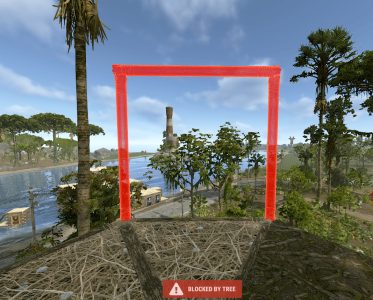
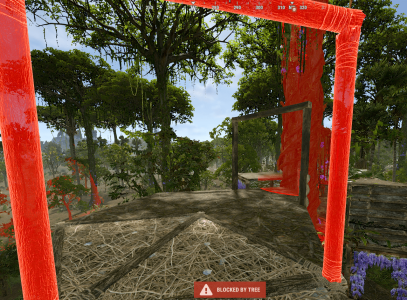
Blocked by Tree

ilineus

Customer
Hey :-) First of all: thank you so much for this awesome plugin! Our players love it and it makes so much fun!
A player reported a strange bug to me: Apparently, it happens randomly every now and then that after removing a building piece (floor, wall, wall frame, whatever), you can no longer place anything in several places on the base and only get the message “blocked by tree.” We haven't been able to figure out the trigger yet. We have also seen this ticket (https://game4freak.io/threads/sometimes-can-build-on-tree-sometimes-not.762/), but leaving the base and returning to it in the hope that the base will recognize the player again does not work. The only thing that has worked so far is reloading the plugin (we don't know yet if this will always work, but it worked well in the last case).

Thank you so much!
Greetings
ilineus
 

Attachments

  • image3.png
    image3.png
    1.3 MB · Views: 14
  • image.png
    image.png
    531.3 KB · Views: 11
  • image2.png
    image2.png
    933.1 KB · Views: 14
Hi, i also have this same problem when building, sometimes you can move away or change position and come back and then it lets you place it
 

Attachments

  • Recording 2026-01-27 155239.mp4
    58.1 MB
Hi, i also have this same problem when building, sometimes you can move away or change position and come back and then it lets you place it
This happens because the player is stepping outside the tree build zone. Once they leave that zone, they lose the free-building capability required to build

From what I can see, the base is already right at the boundary of the zone, so this makes sense. If needed, you can increase the "Size Of Tree Build Zone (Square Side Length)": 20.0 setting to allow building further away and expand the build area
 
ok cheers, i've also noticed that any tree that has had a decayed base on is no longer claimable even though it comes up with the build zone when you approach it. I've also tried putting things like branches on a test gen within the tree house but they seem to keep breaking.
 
This happens because the player is stepping outside the tree build zone. Once they leave that zone, they lose the free-building capability required to build

From what I can see, the base is already right at the boundary of the zone, so this makes sense. If needed, you can increase the "Size Of Tree Build Zone (Square Side Length)": 20.0 setting to allow building further away and expand the build area

According to the player who reported this issue to me several times, she did not leave the base and it happened while she was building. She also mentioned that she was far away from the red border.
 
Back
Top
Chat commands start with a /, while console commands can be entered directly in the F1 console or server console. Use find <keyword> in console to search for available commands related to the plugin. Parameters in < > are required, while [ ] are optional.
This plugin uses Oxide's permission system. Grant or revoke permissions using oxide.grant and oxide.revoke. You can assign them to individual players or groups using their Steam id or group name.
Settings are stored in the config file found under the config/ directory. You can edit this file manually, then reload the plugin to apply your changes.
Persistent data is saved in the data/ directory. This includes things like saved settings, usage stats, or player progress depending on the plugin. Deleting a data file will reset stored progress or customizations.
Language files are located in the lang/ folder. To translate messages, copy the en.json file into your target language folder (e.g. fr, de) and edit the values. Reload the plugin after changes to apply new messages.
This section lists public methods exposed by the plugin for use in other plugins. You can call these via the CallHook method. Ensure the plugin is loaded before calling its API to avoid null reference errors.
These are custom hooks that other plugins can listen for. Simply define a method with the same name and expected parameters in your plugin to handle the event. Hooks are triggered at key moments and are useful for extending or reacting to plugin behavior.
These hooks are injected into the game's code using Harmony. They let the plugin run code at key points in the game's internal logic. You can return values to block or modify behavior. Use with caution — these are powerful and can affect core mechanics.
Cart