Join the Game4Freak Discord Get exclusive plugin sneak peeks, talk directly with VisEntities, never miss important updates, and unlock special discount codes!

F15 Formation Flying with Airshow Maneuvers

Mala

Customer
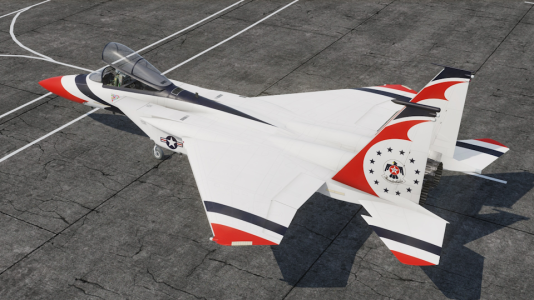
As my favorite plugin developer, I have to drop this here for you Viz. I currently have my server convar for the prewipe F15 and Bradlies set at 72 hours. When the F15 does flyovers, it's really cool. But when I was growing up, I used to get to see airshows that featured the Air Force Thunderbirds and Navy Blue Angels. https://www.airforce.com/thunderbirds/overview https://www.blueangels.navy.mil/ It would be awesome instead of 1 plain F15 tearing by overhead, if 4 or so F15's with a custom paint scheme did airshow maneuvers periodically during their flight. The config could set the time in between maneuvers, after which, the planes would reconverge into formation and fly around the map together. On the last wipe, we had an F15 stuck doing aerial loops with barrel rolls for about 15 minutes over someone's base, and it was really cool. I do realize this would require an F15 skin and some crazy scripting for the formation flying, and the airshow itself would be a massive challenge to create. And if this was packaged up into a Prewipe Event Manager plugin that also adjusted Bradley spawns, even better. I realize there are a couple plugins that do adjust Bradly spawns, like Event Manager on umod, But they are buggy and spawn the Bradlies all in 1 group, instead of across the map. The Thunderbirds usually fly the F16, and the blue Angels fly the F18, so an F15 skin for them has never really existed. But I will attach a pic of an F15 someone mocked up:)
 

Attachments

  • F15ThunderbirdVersion.png
    F15ThunderbirdVersion.png
    816.8 KB · Views: 2
Back
Top
Chat commands start with a /, while console commands can be entered directly in the F1 console or server console. Use find <keyword> in console to search for available commands related to the plugin. Parameters in < > are required, while [ ] are optional.
This plugin uses Oxide's permission system. Grant or revoke permissions using oxide.grant and oxide.revoke. You can assign them to individual players or groups using their Steam id or group name.
Settings are stored in the config file found under the config/ directory. You can edit this file manually, then reload the plugin to apply your changes.
Persistent data is saved in the data/ directory. This includes things like saved settings, usage stats, or player progress depending on the plugin. Deleting a data file will reset stored progress or customizations.
Language files are located in the lang/ folder. To translate messages, copy the en.json file into your target language folder (e.g. fr, de) and edit the values. Reload the plugin after changes to apply new messages.
This section lists public methods exposed by the plugin for use in other plugins. You can call these via the CallHook method. Ensure the plugin is loaded before calling its API to avoid null reference errors.
These are custom hooks that other plugins can listen for. Simply define a method with the same name and expected parameters in your plugin to handle the event. Hooks are triggered at key moments and are useful for extending or reacting to plugin behavior.
These hooks are injected into the game's code using Harmony. They let the plugin run code at key points in the game's internal logic. You can return values to block or modify behavior. Use with caution — these are powerful and can affect core mechanics.
Cart